
IoT Asset Tracking: Tags, Gateways and Dashboards Explained
Tags, gateways and dashboards work together to show where equipment, vehicles, inventory and tools are in real time. This guide explains each part and how to choose a system that fits your business.
Key Takeaways
- An IoT asset tracking system combines tags, gateways and a dashboard into one live view.
- BLE suits indoor rooms and zones, GPS suits vehicles outdoors, and UWB suits work that needs exact positions.
- Gateways collect tag signals and forward them to software that shows location and history.
- A good dashboard shows maps, alerts, search and usage records for fast action.
- Plan for battery replacement, coverage gaps, security and integration before rolling a system out widely.
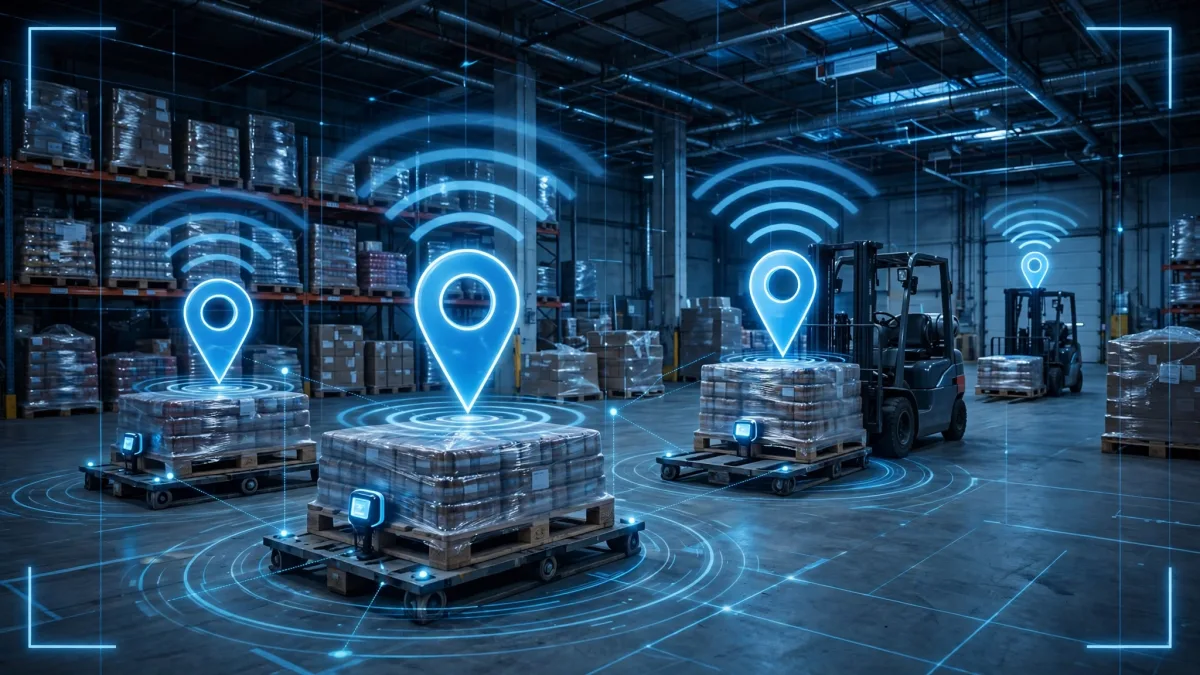
An IoT asset tracking system is a connected setup that shows where equipment, vehicles, inventory and tools are in real time and reports their condition, so a team can find any asset in seconds instead of searching for it. Tags attached to each asset send small radio signals, gateways collect those signals, and a dashboard turns them into a live map, alerts and usage records. This guide explains how the tags, gateways and dashboards work together, which technology fits each job, and how to choose a system that stays accurate. It suits logistics, healthcare, construction, warehousing and fleet teams that lose working time to missing items, and it gives managers a live record they can trust when they plan work, assign equipment and check what has come back.
What Is an IoT Asset Tracking System?
An IoT asset tracking system is a network of small tags, fixed gateways and cloud software that reports the location and condition of physical assets as they move. Each tag carries a unique identity linked to the asset record, so a search returns the right item, its last known room and its recent movement. It works for pallets, tools, medical equipment, vehicles and stock.
According to MarketsandMarkets, the global IoT based asset tracking and monitoring market is projected to grow through 2029, which reflects rising demand for live visibility across many sectors. A tracking system earns its place when missing items slow work or audits take days. The core idea is simple: an asset that reports its own position removes guesswork from daily work.
How Does an IoT Asset Tracking System Work?
An IoT asset tracking system works in four steps. A tag on the asset broadcasts its identity and sensor readings, a nearby gateway or reader hears the signal, the gateway forwards the data to cloud software, and the software turns it into a location on a map plus alerts and records. The cycle repeats at set intervals, so the dashboard stays current.
Tags differ by what they sense. Some report only identity and location, while others add temperature, humidity, vibration or motion. A cold chain shipment needs temperature readings and a shared power tool needs usage and last seen data. Choosing the tag starts with the question the team needs answered.
Software is where raw signals become decisions. It stores each sighting, maps it to a floor plan or map, and applies rules such as geofences and maintenance triggers. When an asset crosses a boundary or misses its expected check in, the system raises an alert. The record that builds up over weeks then shows utilisation patterns, which reveal assets that sit idle.
Tags Compared: BLE, RFID, GPS, LoRaWAN and UWB
No single tag technology fits every asset. The table below compares the main options.
| Technology | Typical accuracy | Range | Power profile | Best fit |
|---|---|---|---|---|
| BLE | Room or zone, about 1 to 3 metres | Tens of metres indoors | Years on one battery | Indoor equipment and warehouse zones |
| Passive RFID | Presence at a reader point | Centimetres to a few metres | No battery, powered by the reader | High volume inventory at checkpoints |
| GPS with cellular | About 3 to 5 metres outdoors | Wide area, wherever networks reach | Weeks, or vehicle powered | Vehicles, trailers and containers |
| LoRaWAN | Building or campus level | Kilometres outdoors | Years | Remote sites, yards and campuses |
| UWB | About 30 centimetres indoors | Tens of metres indoors | Months to a year | Precision work and safety zones |
BLE, which stands for Bluetooth Low Energy, is the usual starting point indoors. According to Asset Infinity, BLE tags broadcast a signal every few seconds, so gateways can tell which room each tagged asset is in. According to a comparison published by Mo Saci Science, typical BLE accuracy is about 1 to 3 metres. RFID, which stands for Radio Frequency Identification, suits checkpoint work: passive tags have no battery and answer only when a reader powers them.
GPS, which stands for Global Positioning System, handles the outdoor world. A GPS tracker receives satellite signals to work out its position, then sends it over a cellular or satellite link. GPS does not work reliably indoors, because roofs, steel and concrete block the satellite signals, so a fleet system usually pairs GPS outdoors with BLE indoors. LoRaWAN, which stands for Long Range Wide Area Network, covers wide areas with very little power and suits remote yards and campuses.
UWB, which stands for ultra wideband, measures time rather than signal strength. A tag sends very short radio pulses, and anchors work out position from how long each pulse takes. According to a comparison published by Mo Saci Science, ultra wideband systems can locate assets to about 30 centimetres indoors. That precision suits assembly line tool tracking and forklift safety zones. UWB needs more anchors and more setup than BLE, so it is best reserved for the assets where precision changes the outcome.
What Do Gateways and Connectivity Do?
Gateways and connectivity move tag data from the physical site to the software that people actually use. A gateway listens for tag signals, adds a time stamp, and forwards the bundle to the cloud over WiFi, ethernet or a cellular link. Without a gateway in range, a tag signal goes nowhere, so gateway placement decides how accurate and how reliable the whole system is.
Indoor gateways are fixed receivers mounted on ceilings or walls, spaced so their listening areas overlap. Overlap matters, because the software estimates position by comparing signal strength at several gateways. Outdoor connectivity uses different paths: cellular suits vehicles that move between towns, LoRaWAN suits fixed assets spread across a large site, and WiFi suits campuses with strong wireless coverage.
What Should a Tracking Dashboard Show?
A tracking dashboard should show a live map, a search box that finds any asset in seconds, the status of each asset, and the alerts that need action now. The map is the heart of the screen, with floor plans indoors and geographic maps outdoors, and each asset shown as a pin with its name and last seen time. A dashboard that only lists rows of text slows the very job it exists to speed up.
Alerts need clear rules and clear owners. Useful alerts include geofence exits, long idle periods, missed check ins, low tag batteries, temperature breaches and shock events. Each alert should name the asset, the rule it broke and the person responsible for acting. Teams should start with a small set of rules that match real problems.
History and reporting turn live location into management insight. Movement history, utilisation reports and maintenance records link service to actual runtime rather than calendar dates. These views help managers spot duplicate purchases and rebalance shared equipment. For ideas on presenting this data clearly, see the guide to dashboards executives actually read, which covers layout and clarity for operational data.
Where Does IoT Asset Tracking Work Best?
IoT asset tracking works best wherever assets move between people and places and nobody can see the whole picture at once. Logistics is the clearest case, with pallets, containers and trailers tracked from warehouse to customer and geofence alerts flagging a load that leaves its route. Warehouse teams use zone level tracking to find pallets without walking every aisle.
Healthcare is another strong fit. Hospitals hold large fleets of mobile equipment, from infusion pumps and monitors to wheelchairs and portable scanners, and staff lose working time searching for them on busy wards. BLE tags show which room each item is in right now, so a nurse can collect the nearest available pump instead of borrowing from another ward.
Fleet and field service teams combine outdoor and indoor tracking. GPS covers vehicles on the road and BLE covers tools inside the vehicle, and the dashboard joins both views into one record per job. A dispatcher can see which vehicle carries the right equipment for the next call. The IoT and embedded systems services from Skills Technology Solutions cover the hardware and software side of this kind of combined deployment.
What Are the Benefits of IoT Asset Tracking?
The benefits of IoT asset tracking start with time saved and losses reduced, then grow into better utilisation and smarter maintenance. Staff stop walking sites to search for equipment, and the hours recovered add up to real working capacity every week. Lost items fall because an asset that leaves its zone raises an alert at the time, not at the next stock count.
Utilisation is often the most surprising benefit. Many organisations own more equipment than they need, because teams buy duplicates when items cannot be found. Usage data shows which assets sit idle, so managers can rebalance the fleet. Maintenance also improves when service follows actual use, because runtime and movement data show which assets work hardest.
What Challenges Should Teams Plan For?
The challenges of IoT asset tracking are practical and can be planned for before the first tag is fitted. Battery life tops the list, because tags fitted in one wave tend to run down together. BLE tags can run for years, while UWB tags at high update rates last months and GPS trackers last weeks unless they draw vehicle power. A battery monitoring view plus a staggered replacement plan keeps the system from going dark across a whole site in the same month.
Coverage gaps and security are the next challenges. Metal racking, thick walls and basements weaken radio signals, so a site survey with test tags catches dead spots before go live. Tags broadcast an identity and dashboards hold location records, so each layer needs protection: encrypted links, signed firmware updates and role based dashboard access are the baseline.
Integration is the challenge that decides whether the system stays in daily use. Location data gains value when it joins the asset register and the maintenance system, so teams should check how the tracking platform shares data before buying. Clean application programming interfaces and standard export formats matter more than a long feature list. The data engineering and analytics services can help join tracking data with the other systems a business already runs, so location, usage and maintenance stay in one record.
How to Choose an IoT Asset Tracking System
Choosing an IoT asset tracking system starts with a short list of assets, the question each one must answer, and the accuracy each question needs. A hospital pump needs a room, a warehouse pallet needs a zone and a vehicle needs a road position. Writing those needs down first prevents the most common mistake: buying a precise system for a job that only needs a zone.
Next, test the shortlist on a real site before committing to a wide rollout. A small pilot with a handful of assets reveals coverage gaps, battery behaviour and dashboard usability in the actual working environment. The pilot also shows whether the team will use the dashboard daily, because a system that looks good in a demo but sits unused on a shelf is no system at all. Finally, confirm the platform can share data with the asset register and maintenance system, and that support covers the whole deployment, not just the first install.
Frequently Asked Questions
What is an IoT asset tracking system?
An IoT asset tracking system is a connected setup of tags, gateways and software that shows where physical assets are and reports their condition in real time. Tags send identity and sensor data, gateways forward it, and a dashboard displays locations, alerts and history.
How accurate is indoor asset tracking?
Indoor accuracy depends on the technology chosen for the job. BLE systems usually place an asset within a room or zone at about 1 to 3 metres, while ultra wideband systems can reach about 30 centimetres indoors. GPS is not reliable indoors, so indoor work needs BLE, UWB, WiFi or RFID instead.
Which tag technology should a warehouse use first?
A warehouse should usually start with BLE tags for zone level tracking of pallets and equipment, plus passive RFID at doorways for high volume checkpoint counts. BLE shows which zone each asset is in without manual scanning, while RFID confirms items passing through dispatch and receiving points.
Do asset tracking tags need a battery?
Most asset tracking tags need a battery, except for passive RFID tags, which draw power from the reader signal. BLE tags can run for years at modest report rates, LoRaWAN tags can also run for years with infrequent messages, and GPS trackers last weeks unless they draw vehicle power.
Can one system track both indoor and outdoor assets?
One system can track both indoor and outdoor assets when it combines technologies behind a single dashboard. BLE or UWB covers rooms indoors, GPS with cellular covers vehicles outdoors, and LoRaWAN covers yards, with all three feeding the same asset records.
Asset tracking turns searching into finding, and finding into better use of the equipment a business already owns. Skills Technology Solutions, a software agency based in Rahim Yar Khan, Pakistan, serving clients in Pakistan and the UK, can help you put this into practice. Contact our team to discuss your project.
Related Articles
Keep reading — more guides you may find useful.

Related Services
Services connected to this guide.